Mindlab CoachesCoaching Marketplace
Find a coachGet matchedFor coachesPricingAbout
Sign inJoin as a coach
Find a coachGet matchedFor coachesPricingAbout
Sign inJoin as a coach
Mindlab CoachesCoaching Marketplace

Mindlab Coaches · User Guide

For clients

Client User Guide — For Clients

How to find the right coach, book and pay safely, get the most from your sessions, and manage your membership.

Version 1.1 · Updated August 6, 2026

Coach guide

Contents

  1. 1. Getting started
  2. 2. Finding the right coach
  3. 3. Booking a session
  4. 4. Payments, cancellations and refunds
  5. 5. Your membership
  6. 6. Getting value from your sessions
  7. 7. Safety, privacy and support
  8. Frequently asked questions

1. Getting started

Create your account

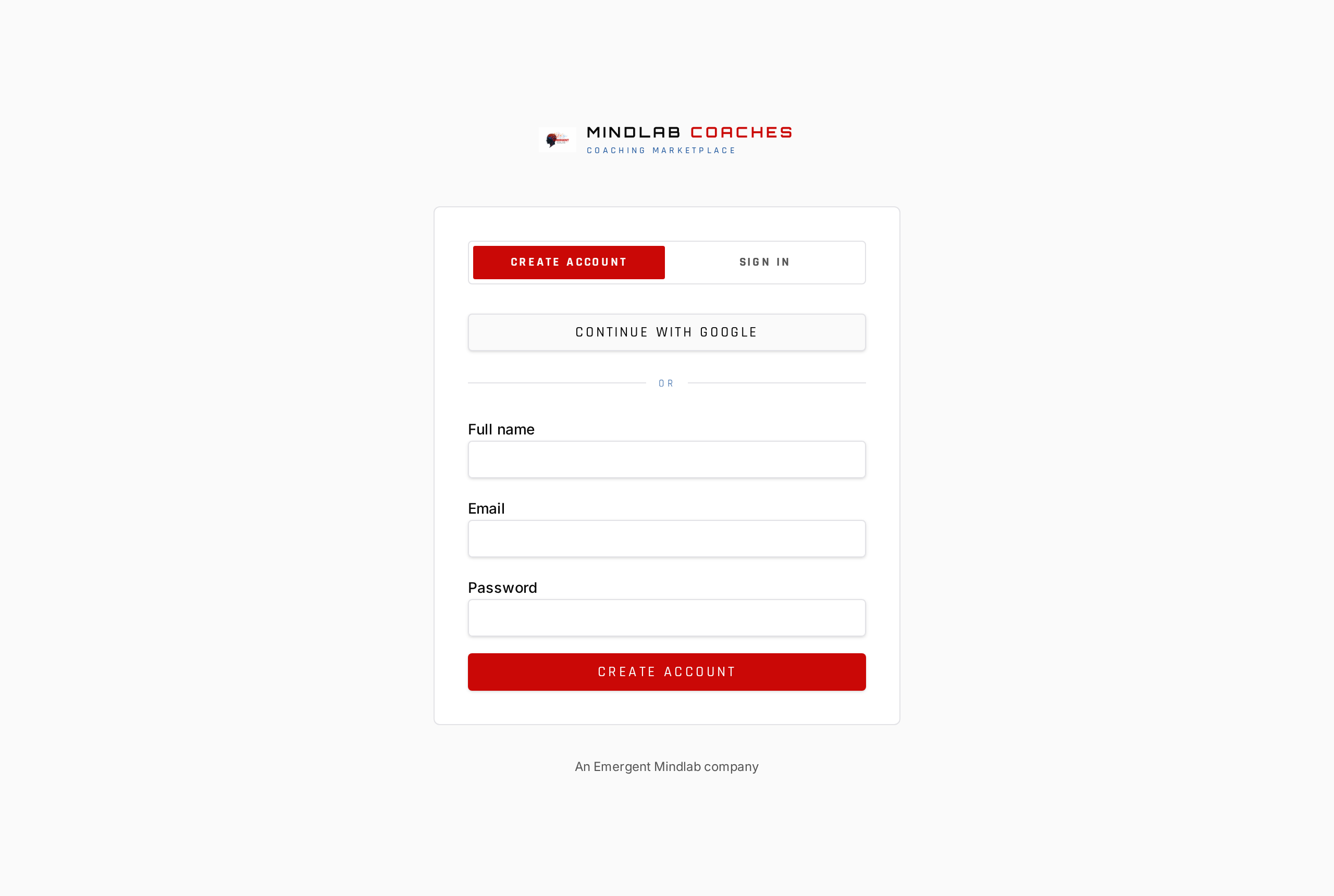
Sign up with email or continue with Google. You will be asked once to review and accept the platform agreements — the Terms of Service, Privacy Policy, Cookie Policy, Acceptable Use Policy, Payments Terms, Coaching Disclaimer and the Client Services Agreement. After you accept, they never interrupt you again; you can read them any time from the Legal Center in the footer.

Mindlab Coaches sign-in screen
Create a client account with email or Google, then accept the platform agreements once.

Client onboarding

A short wizard captures what you are working on, the genres you care about, your time zone, and your budget range. That tunes the directory and your recommendations. Everything is editable later from your dashboard.

2. Finding the right coach

Browse and filter

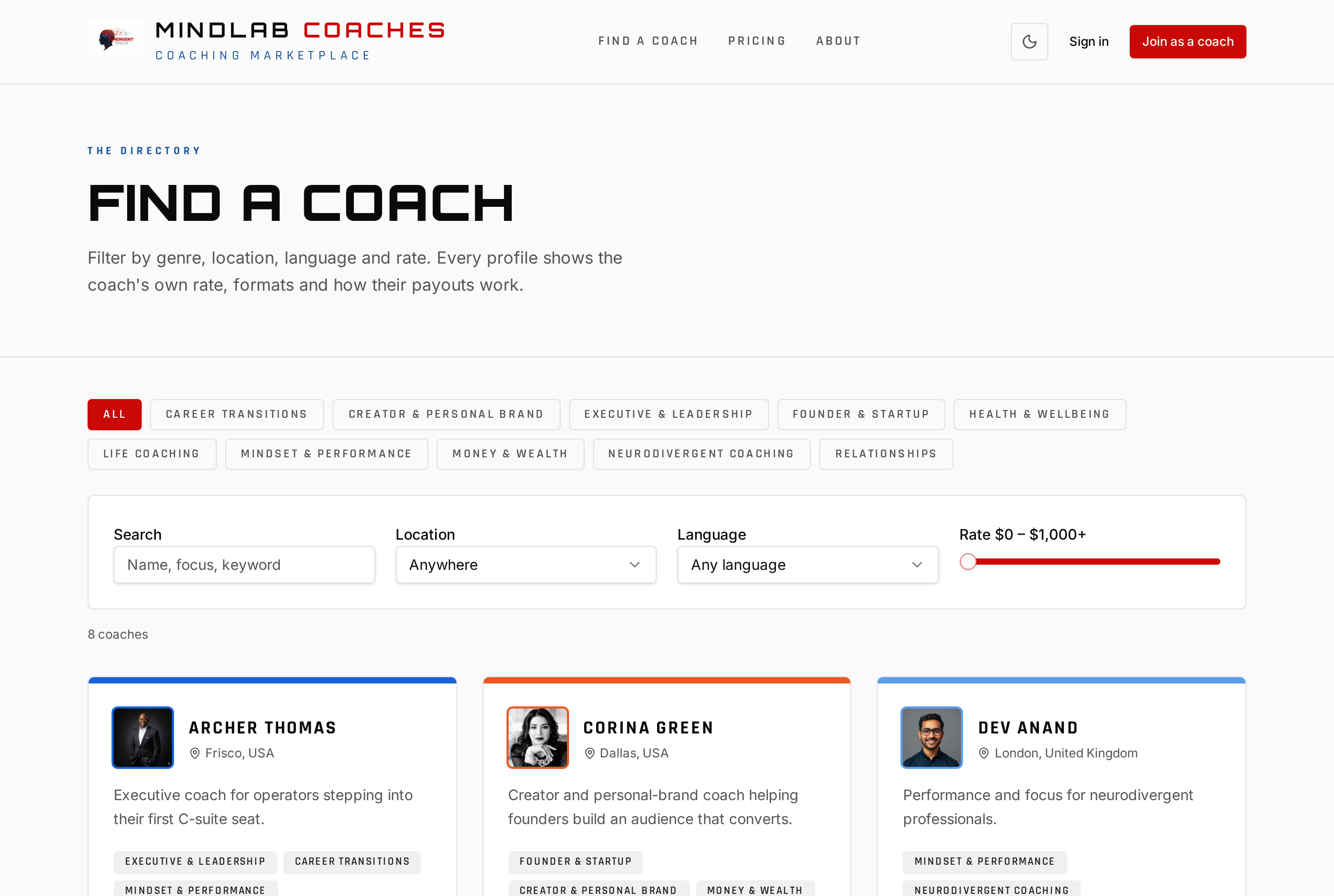
The coach directory filters by category and coach type, location, language, hourly rate range and coaching team — including the Education category with College Prep, College Readiness, College Tutoring and Academic Tutoring. Sort results by recommended, highest rated, newest or price, and your filters and sort are remembered the next time you visit.

Coach directory with filters for location, language, genre, team and rate
Find a coach at /coaches and narrow by genre, location, language, coaching team and rate range.

Read the profile carefully

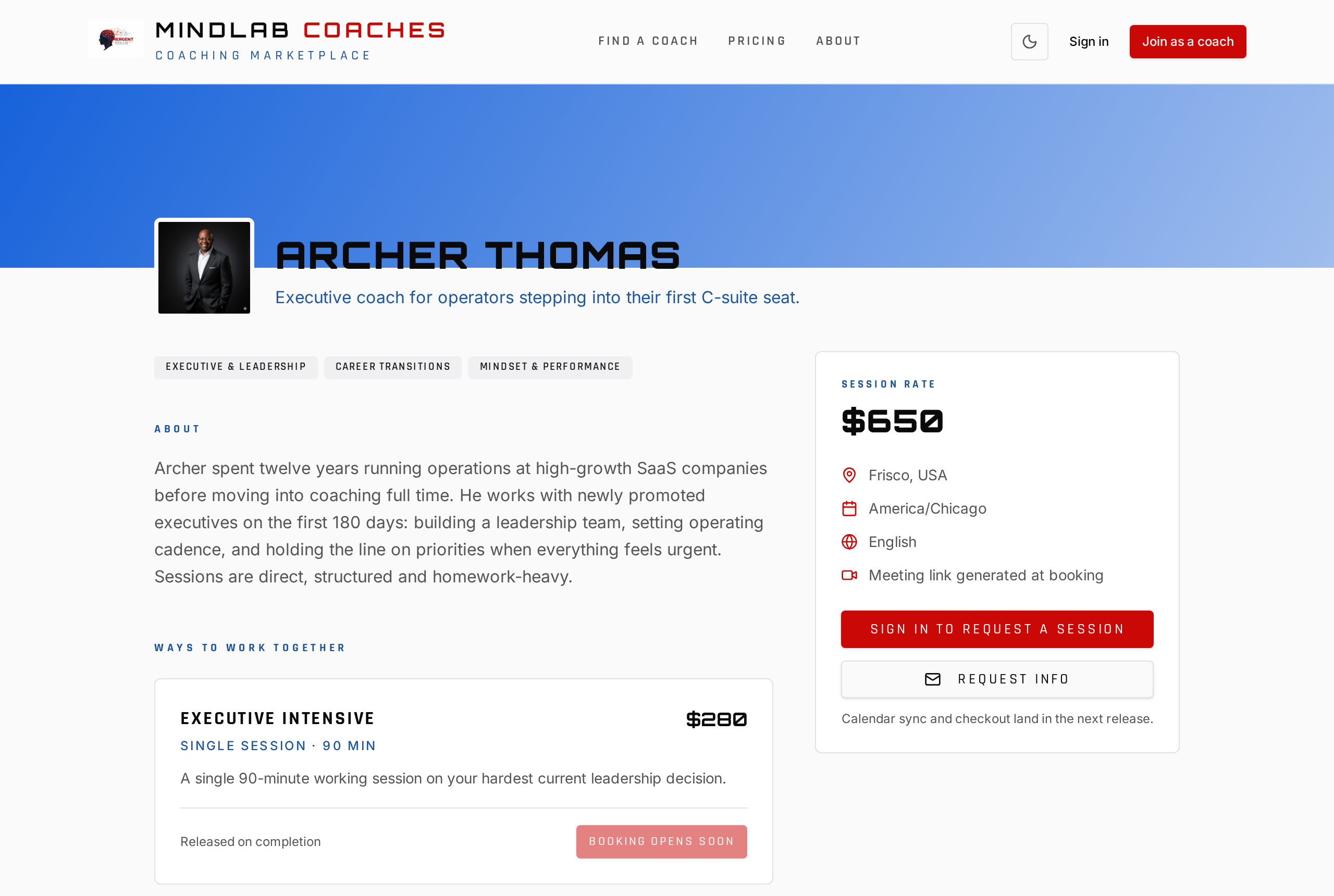
A strong profile tells you most of what you need before you book.

  • The biography — who they typically work with and how they work.
  • Genres — practice areas they claim competence in.
  • Offerings — the specific engagements you can book, with duration and price.
  • Reviews — sort by newest or highest-rated to see both recency and peaks.
  • Coaching teams and “Works with” — other coaches they partner with, and a route to a referral if this coach is not the right fit. Some joint offerings run as a single team event, booked once with more than one coach attending; the shared booking notes on the offering say who joins and how the time is used.
Coach profile page with bio, offerings and booking panel
Each profile shows the coach's approach, offerings with prices, reviews, and the request buttons.

Joint sessions with more than one coach

Some offerings are labelled as joint sessions and list every coach delivering them. You book, pay and cancel exactly as you would for a single-coach session, at one price. Behind the scenes the coaches share the fee under their own agreement — it does not change what you pay, your refund rights, or your cancellation window, which always follows the coach who owns the booking.

Ask before you book

Use “Request info” on any profile to send a question. The coach receives it by email and it is logged for them, so you will get a reply in the thread rather than losing it in an inbox.

Verify what matters to you

Coaches are independent professionals, not employees of Mindlab Coaches. We do not certify or supervise them. If a credential, licence or insurance matters to your situation, ask for it directly before you book.

3. Booking a session

Pick a slot

The booking dialog shows only real availability — the coach's working hours, buffers, minimum notice, time off and existing calendar events are all applied, converted into your time zone. Choose a slot and submit your request.

Hold, confirm, calendar

Your slot is held while the coach reviews. On confirmation you get a branded email with the session details, the meeting link, and an “Add to calendar” invite that works with Google, Outlook and Apple Calendar. A reminder follows 24 hours before.

If a request is declined or expires

The hold releases automatically and you are notified by email. Nothing is charged for a session that never happened.

4. Payments, cancellations and refunds

How payment works

Payment is captured when you book and held until the session is complete — the coach is only paid after they deliver. Card details are handled entirely by our payment processor; the Platform never stores your card number.

Cancelling

Each coach publishes a cancellation window, 24 hours by default. Cancel inside that window from your dashboard and your refund is issued automatically. Outside the window, refunds are at the coach's discretion. If the coach cancels, you are always refunded in full.

Problems with a charge

Contact us before disputing with your bank. Chargebacks filed without using the refund process breach the Payments Terms and can suspend your account — and we can almost always resolve the issue faster.

5. Your membership

What tiers unlock

The free tier lets you browse, book, and message within a monthly message allowance. Paid tiers raise or remove the message cap, open the content library, and apply session discounts. The exact entitlements are shown on the pricing page and at checkout.

Hitting the message cap

When you reach the free-tier limit, the composer tells you and offers an upgrade. Upgrading takes effect immediately and your allowance updates in the same session.

Billing portal

Dashboard → Billing shows your current plan, next renewal date, payment method and invoice history. From there you can upgrade, downgrade, update your card or cancel. Cancelling keeps your access to the end of the paid period; upgrades prorate immediately; downgrades take effect at renewal. Annual billing gives you two months free.

If a payment fails

You enter a grace period with an in-app banner and email reminders. Update your card before the grace period ends and nothing is interrupted.

6. Getting value from your sessions

Before

Send your coach a short note in the thread with the one outcome you want from the session. Coaches consistently report this is the single biggest predictor of a productive first meeting.

During

Join on time using the meeting link in your confirmation email or dashboard. Do not record without the coach's explicit consent — recording laws vary by jurisdiction.

After

Capture your commitments in the message thread so both of you have the same record, and leave an honest review. Reviews must reflect a real session; using them to pressure a coach is prohibited.

7. Safety, privacy and support

Coaching is not therapy

Coaching on this Platform is educational and developmental. It is not medical care, psychotherapy, or licensed professional advice, and no outcome is guaranteed. If you are in crisis or facing a medical emergency, contact your local emergency services immediately.

Keep it on-Platform

On-Platform messaging and payment give you a record, escrow protection and a refund path. Moving off-Platform gives up all three.

Your data and your inbox

Dashboard → Email preferences controls which notification categories you receive, with a master switch and one-click unsubscribe in every email. Operational messages about a live booking always send. For access, correction or deletion of your data, email privacy@mindlabcoaches.com.

Reporting a problem

Report a review or a message from the item itself. For anything else, email support@mindlabcoaches.com; for conduct or legal concerns, legal@mindlabcoaches.com.

Frequently asked questions

Do I need a paid membership to book a coach?
No. Booking and paying for sessions works on the free tier. Paid tiers add messaging capacity, content library access and session discounts.
When is my card charged?
At booking. The funds are held and only released to the coach after the session is completed.
Can I switch coaches?
Yes, at any time. There is no exclusivity and no penalty for booking with more than one coach.
What if the coach does not show up?
You receive a full refund. Report it from the booking so we can follow up with the coach.
How do I see sessions in my own calendar?
Use the “Add to calendar” button in your confirmation or reminder email — it adds the session to Google, Outlook or Apple Calendar in one click.
What is a joint session with two coaches?
An offering delivered by a coaching team. You pay one price and get one booking; the coaches split the fee between themselves. Your refund and cancellation rights are unchanged.

This guide is provided for convenience and does not replace the Mindlab Coaches legal agreements. Where the two differ, the Legal Center documents govern. © 2026 Emergent Mindlab, LLC.

Mindlab CoachesCoaching Marketplace

A marketplace for coaches and creators who do the work — and the clients serious enough to book them.

Platform

  • Find a coach
  • Plans & pricing
  • Join as a coach
  • Brand system

Company

  • About Mindlab Coaches
  • Emergent Mindlab

Guides & legal

  • Coach user guide
  • Client user guide
  • Legal center
  • Terms of Service
  • Privacy Policy
  • Cookie Policy
An Emergent Mindlab company

© 2026 Emergent Mindlab. All rights reserved.